
10 Best Fiber Media Converters for Global Buyers?
Choosing the right Fiber Media Converter is not merely a price comparison. It is a reliability decision.
Global buyers face different network conditions. A factory may need strong EMI resistance and a rugged metal housing. A campus may prioritize long-distance single-mode transmission. A small retail site may require simple plug-and-play installation. The best converter must match the actual link, not just the advertised speed.
Jim Hayes, a respected fiber-optic educator and president of the Fiber Optic Association, puts it clearly: “A fiber optic link is a system, not simply a cable.” This principle guides our selection of the ten best Fiber Media Converter models. Each option deserves attention for optical distance, connector type, copper interface, power design, temperature tolerance, and management features.
Some models support 10/100/1000 Mbps Ethernet. Others offer higher bandwidth, SFP flexibility, or redundant power. Those differences matter when a network runs through a dusty warehouse, a hot roadside cabinet, or a server room with limited space. Installation quality matters too. A technically excellent converter can still fail when fiber ends are dirty or link budgets are ignored.
We also consider standards compliance, warranty support, documentation, and practical testing evidence. Not every popular product performs equally across regions. That is worth admitting. Specifications can look impressive, yet real deployment may reveal heat, compatibility, or firmware limitations.
This guide helps distributors, installers, and enterprise buyers compare credible choices. It focuses on useful evidence, not inflated claims. The right decision may be less obvious than expected.
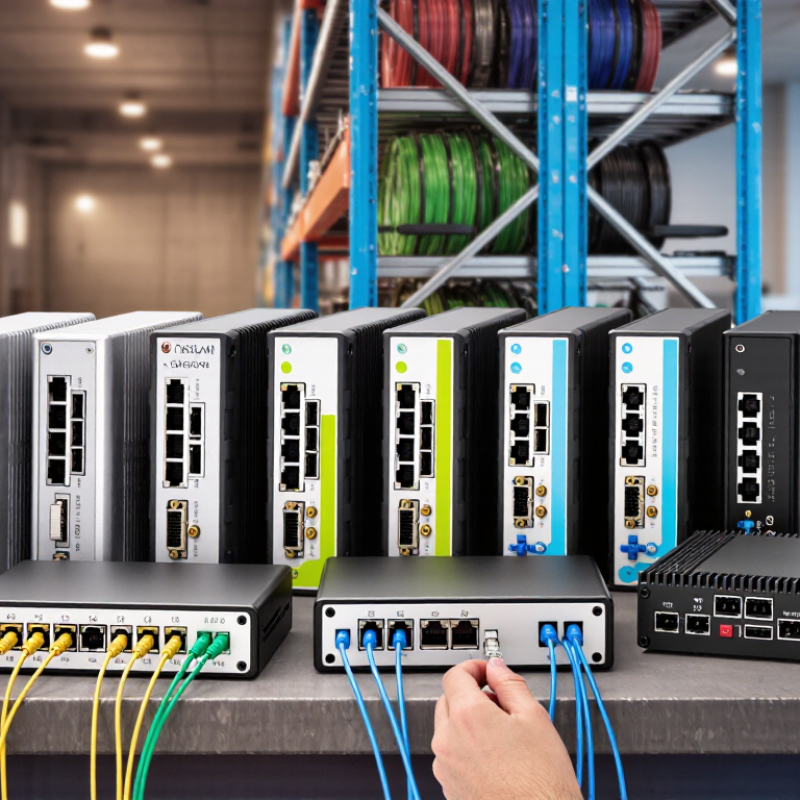
What Fiber Media Converters Are and Why Global Buyers Need Them
Fiber media converters connect copper Ethernet equipment with fiber-optic networks. They translate electrical signals into light, then reverse the process at the receiving end. This simple role helps global buyers extend networks without replacing every switch, camera, or industrial controller.
Demand is practical, not theoretical. The International Telecommunication Union reported about 5.5 billion people online in 2024, equal to roughly 68% of the world’s population. TeleGeography’s 2024 Global Internet Geography report also recorded strong growth in international bandwidth demand. More connected sites require stable links across buildings, campuses, borders, and remote facilities. Fiber offers longer distances and better resistance to electromagnetic interference. Yet, a converter is not a magic fix. A poor match between single-mode fiber, multimode fiber, speed, or connector type can create costly troubleshooting. That detail is easy to underestimate.
Tips: Check fiber type, transmission distance, port speed, connector format, and operating temperature before purchasing. Managed models can provide link alarms and remote diagnostics. Unmanaged models may suit simpler installations. Leave room for future bandwidth. A 1Gbps link may work today, but network upgrades can expose its limits. IT teams should also verify compatibility with existing transceivers and power supplies. In real deployments, documentation is often incomplete. Take photos of installed ports, labels, and cable paths before ordering. That small habit prevents avoidable returns and installation delays.

How to Evaluate Fiber Type, Speed, Distance, and Compatibility
Choosing among the 10 best fiber media converters starts with the fiber itself. Multimode fiber suits short campus links, while single-mode fiber handles longer routes. Match the converter to the installed cable, not the other way around. For speed, check 100 Mbps, 1 Gbps, or 10 Gbps support, then verify the Ethernet standard. A 1G LX converter cannot replace a 10G LR unit. Connector shape matters too. LC and SC plugs are not interchangeable without the correct adapter. TeleGeography’s 2024 Global Bandwidth Research reports continued double-digit growth in international bandwidth demand, making upgrade capacity worth considering.
Distance claims require caution. A stated 20-kilometer reach assumes suitable fiber, clean connectors, and acceptable optical loss. Real buildings add bends, patch panels, and aging splices. Confirm wavelength, transmit power, receiver sensitivity, duplex operation, and link-budget margin. IEEE 802.3 standards define Ethernet behavior, but they do not guarantee every converter will cooperate with every switch. Compatibility also includes auto-negotiation, VLAN handling, jumbo frames, and management features. One common mistake is testing only across a short patch cord. It can pass today and fail in the field.
Tips: Request an optical budget, test both directions, and keep spare SFPs if the design allows them. Check the temperature range for rooftop cabinets or factory floors. FTTH Council Global Alliance reports show fiber deployments continuing across major markets, yet local installation quality still varies. Datasheets are useful, but not perfect. A small pilot test often reveals more than a confident specification.
10 Best Fiber Media Converters for Global Buyers?
How to Evaluate Fiber Type, Speed, Distance, and Compatibility
This chart compares common Ethernet fiber configurations by representative maximum link distance. Multimode fiber is typically used for shorter, cost-effective links, while single-mode fiber supports longer distances. Actual performance depends on the transceiver specification, fiber grade, connector type, wavelength, and network compatibility.
The 10 Best Fiber Media Converters for International Applications
Selecting the ten best fiber media converters for international applications requires more than comparing prices. In real installations, distance, fiber type, connector design, and local network standards determine performance. Single-mode converters suit long links between buildings or cities. Multimode models work well across shorter campus connections. Always verify the wavelength and transmission distance. A mismatch can create unstable links.
Reliable models commonly support 100 Mbps, 1 Gbps, or 10 Gbps Ethernet. SFP-based units offer practical flexibility because technicians can change optical modules later. Managed converters provide monitoring, alarms, and remote fault checks. Unmanaged versions are simpler for small offices and temporary installations. PoE support helps power cameras, access points, and other field devices through copper ports. Industrial applications need wide temperature tolerance, surge protection, and strong resistance to electrical interference.
During cross-border projects, I also check power input ranges, plug compatibility, and documentation quality. These details are easy to overlook. A converter may work perfectly in a laboratory but fail inside a hot roadside cabinet. Redundant power can reduce downtime, although it increases cost and installation effort. I have learned that “best” is never universal. A low-cost unit may be suitable for a clean office rack, but not for a factory floor. Even experienced installers should test fiber polarity, optical loss, and auto-negotiation before shipment. One missed setting can delay an entire international deployment.
Key Features, Standards, and Installation Requirements to Compare
Choosing among the 10 best fiber media converters requires more than comparing prices. Check the network standard first. IEEE 802.3u supports Fast Ethernet, while IEEE 802.3z supports Gigabit fiber links. Copper ports may also list IEEE 802.3ab compatibility. Match the converter with single-mode or multimode fiber. Confirm the wavelength, connector type, transmission distance, and duplex mode. Small mismatches can create unstable links.
Look closely at practical features. Status LEDs should show power, copper activity, fiber activity, and link faults. Auto-negotiation helps, but fixed-speed settings may suit older network equipment better. Store-and-forward operation can reduce damaged packet transmission. Industrial installations may require wide temperature support, surge protection, and DIN-rail mounting. An unmanaged converter is simple, while a managed model can provide diagnostics and remote monitoring.
Installation details often decide real performance. Clean every fiber endface before connection. Respect the cable’s bend radius, especially inside crowded cabinets. Calculate the optical link budget, including connector and splice losses. Leave ventilation space around the power supply. Use proper grounding in electrically noisy areas. I have seen a link fail because the fiber pair was reversed, not because the converter was defective. A perfect ranking is difficult, since one model may excel in a factory but perform poorly in a small office. Check documentation carefully. Then test the link under its expected load.
| Rank | Anonymous Product Profile | Best For | Ethernet Interface | Fiber Type | Maximum Reach | Optical Wavelength | Fiber Connector | Operating Temperature | Power Input | Key Standards | Installation Requirements |
|---|---|---|---|---|---|---|---|---|---|---|---|
| 1 | Profile A Best Overall | General enterprise and building-network links | 10/100/1000BASE-T copper; 1 × RJ45 | Single-mode fiber, duplex | Up to 20 km | 1310 nm | Duplex SC | 0°C to 50°C | 100–240 VAC external adapter | IEEE 802.3, 802.3u, 802.3ab, 802.3z; IEEE 802.3x flow control | Use matching 9/125 µm single-mode fiber and verify the optical power budget. Keep copper cable within 100 m and install away from high-voltage wiring. |
| 2 | Profile B Best for Short Runs | Office floors, server rooms, and campus distribution | 10/100/1000BASE-T copper; 1 × RJ45 | Multimode fiber, duplex | Up to 550 m at 1 Gb/s | 850 nm | Duplex LC | 0°C to 50°C | 100–240 VAC external adapter | IEEE 802.3, 802.3u, 802.3ab, 802.3z; auto-negotiation and auto MDI/MDI-X | Use OM2, OM3, or OM4 multimode fiber. Clean LC connectors before mating and observe the maximum distance specified for the selected fiber grade. |
| 3 | Profile C Best for Long Distance | Inter-building and metropolitan-area links | 10/100/1000BASE-T copper; 1 × RJ45 | Single-mode fiber, duplex | Up to 40 km | 1310 nm | Duplex LC | -10°C to 60°C | 12 VDC terminal block or adapter | IEEE 802.3, 802.3u, 802.3ab, 802.3z; Class 1 laser safety requirements | Confirm transmitter and receiver compatibility at both ends. Use outdoor-rated fiber or conduit between buildings, provide grounding where required, and protect the link from lightning exposure. |
| 4 | Profile D Best for Industrial Sites | Factories, transportation systems, and control cabinets | 10/100/1000BASE-T copper; 1 × RJ45 | Single-mode or multimode, duplex | Up to 20 km, depending on optic | 850 nm or 1310 nm | Duplex SC or LC | -40°C to 75°C | 9–36 VDC redundant input | IEEE 802.3, 802.3u, 802.3ab, 802.3z; DIN-rail mounting; industrial EMC design | Mount on a compatible 35 mm DIN rail, use a protected DC supply, and maintain separation from variable-frequency drives and motor cables. Verify the enclosure and EMC requirements for the site. |
| 5 | Profile E Best for Managed Networks | Networks requiring remote diagnostics and monitoring | 10/100/1000BASE-T copper; 1 × RJ45 | Single-mode fiber, duplex | Up to 20 km | 1310 nm | Duplex LC | 0°C to 50°C | 100–240 VAC external adapter | IEEE 802.3, 802.3u, 802.3ab, 802.3z; SNMP or web management; VLAN pass-through | Assign a management IP address if supported, document the fiber path, and enable link-loss or remote fault notification. Confirm that VLAN tags and jumbo frames required by the network are passed correctly. |
| 6 | Profile F Best for PoE Devices | Remote cameras, wireless access points, and access-control equipment | 10/100/1000BASE-T PoE copper; 1 × RJ45 | Single-mode or multimode, duplex | Up to 20 km, depending on fiber module | 850 nm or 1310 nm | Duplex SC or LC | 0°C to 50°C | 48 VDC or 100–240 VAC, model dependent | IEEE 802.3, 802.3u, 802.3ab, 802.3z; IEEE 802.3af or 802.3at PoE | Check the total PoE power budget and voltage drop before connecting the endpoint. Use Category 5e or better copper cable within 100 m and provide adequate ventilation for the power circuitry. |
| 7 | Profile G Best for Gigabit Uplinks | High-throughput access-layer and storage connections | 1000BASE-T copper; 1 × RJ45 | Multimode fiber, duplex | Up to 550 m at 1 Gb/s | 850 nm | Duplex LC | 0°C to 50°C | 100–240 VAC external adapter | IEEE 802.3ab and 802.3z; full-duplex operation; 802.3x flow control | Use OM3 or OM4 fiber for new installations where practical. Set connected Ethernet ports to auto-negotiation unless the network design requires fixed settings, and verify full-duplex operation after commissioning. |
| 8 | Profile H Best for Harsh Environments | Outdoor cabinets, utilities, and roadside equipment | 10/100/1000BASE-T copper; 1 × RJ45 | Single-mode fiber, duplex | Up to 30 km | 1310 nm | Duplex SC | -40°C to 75°C | 10–36 VDC redundant input | IEEE 802.3, 802.3u, 802.3ab, 802.3z; IP-rated enclosure option; industrial EMC requirements | Install inside a suitable weatherproof enclosure unless the converter itself is outdoor-rated. Use shielded or appropriately grounded cable where required, control condensation, and provide surge protection for exposed copper runs. |
| 9 | Profile I Best for Space-Constrained Racks | Telecommunications racks and dense network cabinets | 10/100/1000BASE-T copper; 1 × RJ45 | Single-mode fiber, duplex | Up to 20 km | 1310 nm | Duplex LC | 0°C to 50°C | 5 VDC or 12 VDC, model dependent | IEEE 802.3, 802.3u, 802.3ab, 802.3z; rack-mount chassis compatibility | Allow airflow around the enclosure and avoid bending fiber below the cable manufacturer's minimum bend radius. Label both ends of every fiber and secure adapters to prevent strain on connectors. |
| 10 | Profile J Best for Flexible Deployment | Mixed-fiber upgrades and multi-site installations | 10/100/1000BASE-T copper; 1 × RJ45 | Selectable single-mode or multimode via interchangeable optic | 550 m to 80 km, depending on optic | 850 nm, 1310 nm, or 1550 nm, optic dependent | Duplex LC, SFP-based | 0°C to 50°C | 100–240 VAC external adapter | IEEE 802.3, 802.3u, 802.3ab, 802.3z; MSA-compatible SFP option; digital diagnostic monitoring when supported | Use identical or interoperable optics at both ends, match fiber mode and wavelength, and verify the optical budget. Do not mix single-mode and multimode optics unless the equipment documentation explicitly permits it. |
How to Select the Right Converter for Different Network Environments
10 Best Fiber Media Converters for Global Buyers?
Selecting a fiber media converter starts with the network environment, not the product list. A small office may need a compact, unmanaged converter for simple Ethernet extension. A factory floor needs stronger protection against vibration, dust, heat, and electromagnetic interference. Check the operating temperature range carefully. A cabinet near machinery can become unexpectedly hot.
Match the converter with the fiber type and transmission distance. Multimode fiber suits shorter links inside buildings, while single-mode fiber supports longer campus or metropolitan connections. Connector type matters too. An incompatible port can delay installation and increase replacement costs. Confirm the required speed, such as 1G or 10G, before ordering. Do not assume automatic compatibility.
Power conditions deserve equal attention. Industrial sites may require redundant power inputs or a wide voltage range. Outdoor deployments need suitable enclosures and surge protection. Managed models can provide link monitoring, alarms, and remote configuration. Unmanaged models reduce setup time, but troubleshooting becomes more manual. That trade-off is easy to underestimate.
I recommend testing one unit with existing switches, patch cords, and fiber before purchasing in volume. Check link recovery after power interruption. Observe performance during temperature changes. Documentation should clearly state standards, warranty terms, and support procedures. Some converters look affordable until installation adapters and spare power supplies are added. My own selection process is still imperfect; distance tables rarely reflect every connector, splice, or aging cable in the field.
Article Source:
NORTH EASTON MACHINE • 218 Elm Street • North Easton, MA 02356 • 508-238-6219