
What Is the Best Control Room Console Desk in 2026?
Choosing the best Control Room Console Desk in 2026 is not a matter of picking the widest surface or the most polished finish. It is about how well the desk supports people through long, demanding shifts. Operators need clear sightlines, reachable controls, adjustable monitor positions, and enough space for notes, headsets, and essential equipment. Small design choices matter. A screen edge that catches glare can become tiring by midday.
Ergonomist Alan Hedge is often credited with the reminder, “Your best posture is your next posture.” That idea is useful when assessing a console. A good setup should let operators change position, move comfortably, and reach controls without repeated stretching. It should also suit the room’s workflow, equipment, and team—not just look impressive in a product photograph. Details make the difference.
This guide compares the features that matter when evaluating console desks in 2026, including ergonomics, modularity, cable management, durability, and configuration options. It also considers questions buyers can overlook, such as service access and future equipment changes. There is no universal winner. A desk that works beautifully for one control room may frustrate another. Even a careful checklist can miss something; operators’ real feedback should shape the final decision.
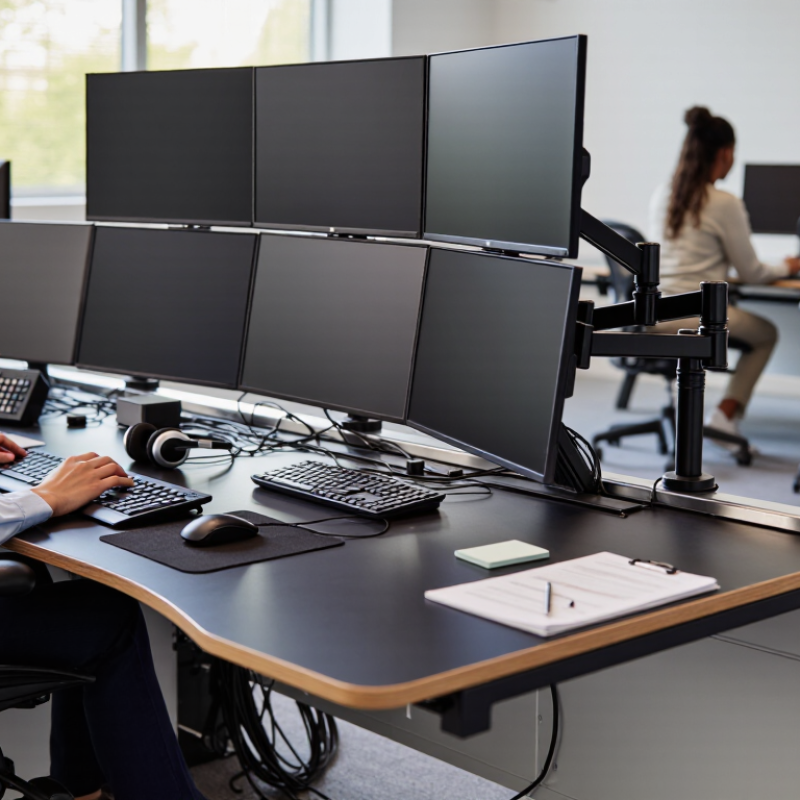
What a Control Room Console Desk Is and How It Supports Operators
A control room console desk is a purpose-built workstation for operators who monitor systems, review alerts, and communicate during live operations. It differs from ordinary office furniture because its surface, monitor supports, cable routes, and storage are arranged for sustained, task-focused use. A dispatcher may need several screens, a radio handset, a keyboard, and clear space for notes—all within comfortable reach. Small layout decisions matter. A frequently used control should not sit behind a monitor or require repeated twisting.
The desk supports operators by keeping essential tools visible and reducing unnecessary movement. Adjustable height, suitable leg clearance, and well-placed task lighting can help accommodate different users and long shifts. Cable management also matters: loose leads can obstruct access or complicate maintenance. Still, a neat workstation does not guarantee good decisions. Poor screen placement, glare, noise, or confusing software can undermine an otherwise capable setup. The right arrangement depends on the work itself, so teams should test mock-ups with actual operators before committing. One detail is easy to miss: people may change posture and tasks throughout a shift. A layout that feels efficient during a short demonstration may become tiring by midnight.

Key Ergonomic and Technical Requirements for 24/7 Operations
What Is the Best Control Room Console Desk in 2026?
Key Ergonomic and Technical Requirements for 24/7 Operations
In a 24/7 control room, the console is part of the operating system, not ordinary office furniture. Operators may scan alarm displays, answer radios, and switch between screens for hours. Choose a desk with adjustable height, enough depth for monitor placement, and clear space for knees and feet. OSHA’s Computer Workstations eTool advises placing monitors about 20–40 inches from the eyes, with the screen top at or below eye level. Keep frequently used controls within easy reach; repeated stretching can add strain during long shifts. Small details matter.
Technical requirements deserve equal attention. ISO 11064, the international standard series for control-centre ergonomics, addresses workstation design, layout, and human-system interaction. Its principles support clear sightlines, sensible control placement, and consistent operator access. For a practical check, sit at the console and confirm that displays remain readable without leaning forward. Then test the chair, task lighting, cable routes, and room temperature during a realistic shift. One mock-up is not enough.
Fatigue cannot be fixed with furniture alone. A WHO and ILO analysis published in Environment International in 2021 associated working 55 or more hours weekly with a 35% higher stroke risk and a 17% higher risk of death from ischemic heart disease, compared with 35–40 hours. These figures concern long working hours, not console design specifically. Still, they make breaks, workload planning, and adjustable workstations hard to dismiss. I would question any “perfect desk” claim: operators, tasks, and room conditions differ.
What Is the Best Control Room Console Desk in 2026? - Key Ergonomic and Technical Requirements for 24/7 Operations
| Selection Dimension | Practical Requirement or Target | Why It Matters in 24/7 Operations | What to Verify |
|---|---|---|---|
| Work-surface height | Choose a height-adjustable surface or a configuration matched to the operators and seating. Keep the keyboard and pointing device near elbow height, with shoulders relaxed. | A poorly matched work height can encourage raised shoulders, bent wrists, or prolonged awkward posture during long shifts. | Test seated and standing positions with the actual chair, keyboard, and operators; confirm the adjustment range suits the user population. |
| Seated and standing use | Where duties permit, support posture changes with sit-stand adjustment or a suitable mix of seated and standing work positions. | Changing posture can reduce time spent in one static position. It does not replace breaks or good workstation setup. | Check adjustment controls, stability throughout the range, cable movement, and whether operators can change position without disrupting equipment. |
| Monitor placement | Position frequently used screens directly in front of the operator. A common starting point for viewing distance is about 50–100 cm; adjust for screen size, text, and visual comfort. | Good placement helps limit repeated neck rotation and supports comfortable viewing across a long shift. | Mock up the actual display count and sizes. Confirm key information is readable without sustained forward leaning or frequent head turning. |
| Display height and angle | Place the top of the primary display at or slightly below eye level as a starting point, and tilt screens to reduce glare while keeping the viewing posture comfortable. | Screen height and reflections can contribute to neck discomfort and visual fatigue. | Assess seated and standing eye positions, lighting reflections, viewing angles, and sightlines to shared room displays. |
| Keyboard and pointing-device zone | Provide enough clear, usable space for the keyboard and mouse or other input device. Keep wrists in a relaxed, generally straight position during use. | Operators need reliable access to controls without reaching or resting their arms on sharp edges. | Test the actual input devices and typical operating tasks. Check for adequate forearm support and unobstructed movement. |
| Legroom and operator clearance | Provide unobstructed space for the operator’s legs, feet, and chair movement; keep stored equipment, power supplies, and cables out of the primary leg area. | Restricted clearance can limit posture changes and make it harder to enter or leave the workstation safely. | Inspect the full seated area, including under-desk equipment, chair travel, foot support, and access for maintenance. |
| Lighting and glare control | Plan task and ambient lighting for the actual room and display use. Use controllable lighting and manage reflections rather than relying on a single fixed brightness level. | Control rooms may combine screens, incident lighting, and changing shift conditions; glare and excessive contrast can hinder viewing comfort. | Evaluate the workstation at different times and lighting settings. Check screen reflections, task visibility, and light spill onto neighboring operators. |
| Ventilation and equipment heat | Allow sufficient airflow around installed computers and other heat-producing equipment; do not block equipment vents or rely on sealed cavities without thermal review. | Inadequate heat removal can affect equipment reliability and make the operator area uncomfortable. | Review equipment heat loads, ventilation paths, service clearances, and room HVAC capacity with the facilities and IT teams. |
| Power and continuity | Provide correctly rated, clearly organized power distribution and coordinate essential equipment with the site’s backup-power and continuity plan. | Unplanned power loss can interrupt monitoring and communications. The desk itself does not replace facility-level backup systems. | Confirm electrical loads, circuit allocation, grounding, UPS coverage where required, labeling, and applicable local electrical requirements. |
| Cable management and service access | Route and secure cables to prevent snags, trip hazards, accidental disconnection, and blocked ventilation. Keep maintenance access practical. | Operators and technicians need to work safely around dense connections while minimizing disruption to live operations. | Inspect cable paths, strain relief, labeling, access panels, and the ability to replace components without dismantling unrelated equipment. |
| Surface durability and cleanability | Choose a work surface and finish suitable for frequent cleaning and the expected daily wear; specify edge details that are comfortable for routine contact. | Continuous use and repeated cleaning place greater demands on surfaces and edges than occasional office use. | Review cleaning-agent compatibility, seam and edge construction, scratch resistance, and the supplier’s care instructions. |
| Configuration and future changes | Allow for planned changes in displays, communications devices, and operator roles, with modular mounting and documented load limits where applicable. | Control-room technology and workflows can change over the service life of the furniture. | Confirm mounting compatibility, accessory capacity, structural limits, upgrade options, and the cost and process for reconfiguration. |
Main Console Desk Types and Their Typical Applications
Fixed-height console desks suit rooms with stable teams, dedicated monitoring walls, and carefully planned equipment layouts. Their broad work surfaces can hold multiple displays, a keyboard, and a radio handset. However, a fixed height may not fit every operator. Small mismatches matter during long shifts.
Modular, height-adjustable desks work better where staffing or equipment changes often. Sit-stand designs can support posture changes, while curved, multi-operator consoles help dispatch teams share screens and communicate across a room. Choose based on sightlines, reach, cable access, and the tasks operators perform—not appearance alone. A console can still be badly planned.
That figure does not show that desk design prevents outages. It does underline why operators need clear access to controls, reliable equipment placement, and layouts that reduce avoidable distraction.
How to Compare Control Room Console Desks in 2026
When comparing control room console desks in 2026, start with the work, not the finish. Map each operator’s displays, radio equipment, and shared controls, then check whether seated and standing users can reach them without leaning. Adjustable height matters, but so do clear sightlines, knee space, glare control, and room for headsets or paperwork. Try the layout during a realistic shift. A tidy showroom setup can hide awkward reaches.
Ergonomics deserves serious attention. The U.S. Bureau of Labor Statistics reported 2.6 million nonfatal workplace injury and illness cases in private industry for 2023. That figure is not specific to console work, and it does not prove that desk design caused those cases. Still, it supports checking posture, movement, and fit rather than judging by appearance alone. Look for durable surfaces, accessible cable paths, and service panels that technicians can open without dismantling neighboring stations. Small details matter.
Ask vendors for load limits, adjustment ranges, and maintenance guidance in writing. Compare these against actual monitor weights and equipment needs. If possible, test a sample with operators across different heights and shifts; note discomfort, blocked views, and noisy adjustments. A desk that fits one person may frustrate another. Budget for future equipment changes, too, but avoid paying for modular features your team will never use. The best choice is the one that fits the room, workflow, and people—with evidence to back it up.
Choosing a Desk for Your Team, Room, and Operational Needs
The best control room console desk in 2026 is the one that fits the work, the room, and the people using it.
Map each role, equipment type, and shift pattern before choosing a layout. A two-person dispatch station needs different elbow room from a single operator monitoring several video feeds. Measure chair travel, door swings, walkways, and screen sightlines in the actual room. Small details matter.
Think about how the team works across a full shift. Check that frequently used controls sit within comfortable reach, and that screens remain visible without awkward neck turns. Allow space for keyboards, radios, paperwork, and shared equipment. Cable routes should stay tidy and accessible for maintenance. Good airflow around computers also helps prevent heat from building beneath the desk. These checks are practical, but they cannot replace testing a sample setup with the people who will use it.
Room conditions shape the choice, too. A narrow space may benefit from a compact or modular layout, while a larger team may need clear separation between stations. Consider adjustable work surfaces if operators vary in height or alternate between sitting and standing. A plan can look perfect on paper and still feel cramped during a busy shift. Leave room to reassess after installation; operational needs rarely stay exactly the same.
Article Source:
NORTH EASTON MACHINE • 218 Elm Street • North Easton, MA 02356 • 508-238-6219